
What Is Loop Engineering? A Practical Guide
Loop engineering means designing a stop condition before you start, not after. How to build a bug-fix loop, avoid runaway token spend, and use /goal and /loop in Claude Code.
I once set a loop running against "make the error handling better" and came back to forty commits that all failed the same test in three different ways. Vague goals do that to an agent left unattended. That's the entire problem loop engineering exists to solve.
TL;DR
- Write the stop condition before you write the prompt. "Make it good" is not a stop condition, "all tests pass" is.
- Never let the agent grade its own work. Use a deterministic check like a test suite or a lint pass, or hand grading to a separate verifier.
- Cap iterations or token spend explicitly. An unattended loop with a fuzzy goal will happily run all afternoon on your dime.
- Use
/goalfor a single outcome-driven task and/loopfor something that should run repeatedly on its own schedule. They solve different problems. - Watch for oscillation. If the agent keeps flipping between two "fixes," the verifier is usually wrong, not the code.
- Skip the loop entirely when one well-scoped prompt can finish the job in a single pass. Loops carry overhead, don't pay it for nothing.
Write the stop condition before the prompt
Every loop needs three things: an action, a way to check the action worked, and a rule for when to stop. Most people write the action first and figure out the stop condition later, if at all. That's backwards.
"Make it good" isn't a stop condition. Neither is "keep going until it looks right," because looking right is exactly the kind of judgment call a model will happily fake. A stop condition has to be something you, or a script, can check without asking the same model that did the work.
Here's the cycle:
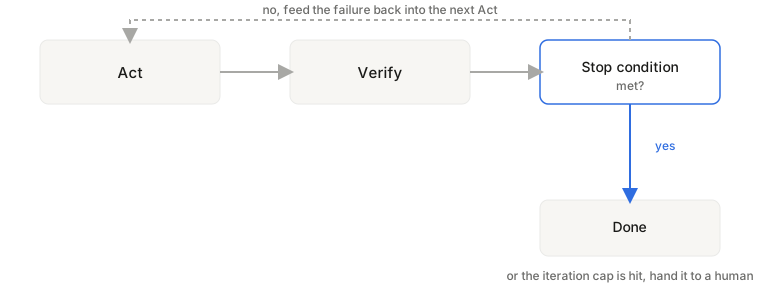 Act, verify, check the stop condition. Feed a failure back into the next Act instead of starting over.
Never let the agent grade its own work
The fastest way to burn a weekend of tokens on nothing is to let the same model that wrote the code also decide whether the code is done. It will tell you it's done. Models are trained to be helpful, and "I failed" doesn't sound helpful, so it gets talked out of showing up even when it's true.
Two ways around this. First, prefer a deterministic check over an LLM opinion whenever one exists: a test suite passing, a lint command returning zero, a build finishing without errors. Second, when you genuinely need judgment, like "does this API design match our conventions," hand that judgment to a separate agent that never saw the first agent's reasoning, only its output. A model grading its own homework isn't a review, it's a formality.
Cap the iteration budget
A loop with a fuzzy stop condition doesn't fail loudly. It fails by quietly consuming your token budget for hours while producing something that technically runs and definitely isn't what you wanted. I've watched a refactor loop "improve" a data layer that was already fine, because I never told it what done looked like.
Set a hard cap on iterations, wall clock time, or spend before you start, not after you notice the bill. Five or six attempts is plenty for most bug fixes. If it hasn't converged by then, the problem probably isn't something more of the same loop will solve.
Watch for oscillation
A specific failure mode worth naming: the agent alternates between two fixes, each one "solving" the problem the other one just broke. Fix A passes test one and fails test two. Fix B passes test two and fails test one. The loop just ping pongs.
When you see this, the bug usually isn't in the code, it's in the verifier. Either the two tests contradict each other, or the stop condition is checking the wrong thing. Oscillation is a signal to stop the loop and go read the tests yourself, not a signal to raise the iteration cap and hope.
A worked example: a bug fix loop
Here's the pattern stripped down to the parts that matter: a deterministic check and a hard cap.
import subprocess

MAX_ITERATIONS = 5

def run_tests() -> bool:
    result = subprocess.run(["pytest", "-q"], capture_output=True)
    return result.returncode == 0

def act(prompt: str) -> str:
    # Swap this for a real call to your agent of choice. The Claude Agent SDK
    # or Claude Code in headless mode both work here.
    raise NotImplementedError("Wire this up to your agent.")

def bug_fix_loop(failing_test: str):
    prompt = f"Fix the failing test: {failing_test}. Do not change the test itself."
    for i in range(MAX_ITERATIONS):
        act(prompt)
        if run_tests():
            print(f"Fixed after {i + 1} attempt(s).")
            return
        prompt = f"The test is still failing after that change. Try again: {failing_test}"
    print("Hit the iteration cap. Handing this one to a human.")
This is a skeleton, not something to copy into production. The point is the shape: run_tests is the deterministic verifier, MAX_ITERATIONS is the cap, and the prompt changes each round instead of repeating verbatim.
/goal and /loop in Claude Code
Claude Code has two built-in commands that map directly onto this. /goal sets an outcome for Claude to keep working toward across turns in the current session, so instead of re-prompting after every step, you describe the destination once and let it iterate toward it. /loop runs a prompt or command repeatedly on an interval while the session stays open, which is the tool for the "check this every hour" kind of work rather than the "finish this task" kind.
Use /goal when you have one task and a real stop condition, like fixing a specific bug or getting a build passing. Use /loop when the work is genuinely recurring, like triaging new issues on a schedule. Don't reach for /loop just because a task feels big. Size isn't the deciding factor, repetition is.
When to skip the loop
Not everything needs this ceremony. If a single, well-scoped prompt can finish the job in one pass, a loop just adds latency and a verifier you now have to maintain. I skip loops entirely for anything I can review myself in under a minute. Save the loop architecture for work that's genuinely iterative, something with a real failure signal, like a test suite, that you don't want to babysit through five attempts.
If you want more breakdowns like this, subscribe to the site or follow along on YouTube at @seeqcode.
Subscribe
New posts on AI, developer relations, photography, and the odd long walk, straight to your inbox. No spam.